For developers and architects who need a quick, factual answer
Check whether your AEM 6.5 code is ready for Cloud Service
The Surge Migrate readiness scan checks AEM 6.5 code and Best Practices Analyzer reports against 33 code rules and 31 BPA pattern codes, in your browser, for free and without an account. You get a readiness score, every blocker with its file, line and fix, and an effort range.
The problem
Before a Cloud Service move, teams usually guess: a few developers grep for known APIs, someone opens the BPA report, and the estimate depends on who looked. Nobody wants to upload a client's code to a website to find out.
What to know first
Best Practices Analyzer is Adobe's free tool inside AEM 6.5 that reports patterns needing work before a cloud move, such as legacy components, custom Oak indexes and replication agents. It sees the repository from inside AEM. A code scan sees the source: removed Java APIs, admin sessions, schedulers and OSGi configuration formats. Together they give the fullest picture of what has to change, which is why the readiness scan accepts both and combines them when you add both to a project.
How to do it in Surge Migrate
- Export your code or a BPA report. Make a zip of the repository with git archive --format=zip -o aem-repo.zip HEAD, or in AEM 6.5 open Tools, Operations, Best Practices Analyzer and export the CSV. Either works; both give the fullest picture.
- Drop it on the scan page. Open the readiness scan and drop the file. It is read on your machine; nothing is uploaded. No files at hand? Press See a sample result, or answer 8 quick questions for an estimate.
- Read the findings. Each finding shows severity (blocker, major, minor), how automatable the fix is, sample file paths and lines, the fix and the hours it adds. Blockers stop a Cloud Manager build; fix those first.
- Book a free review of the results. From the results, book a free 30-minute review with a senior AEM architect who walks through what the findings mean for your estate.
- Keep it in a project (optional). Create a free account and add the scan to a project to share it with your team and turn it into a Blueprint.
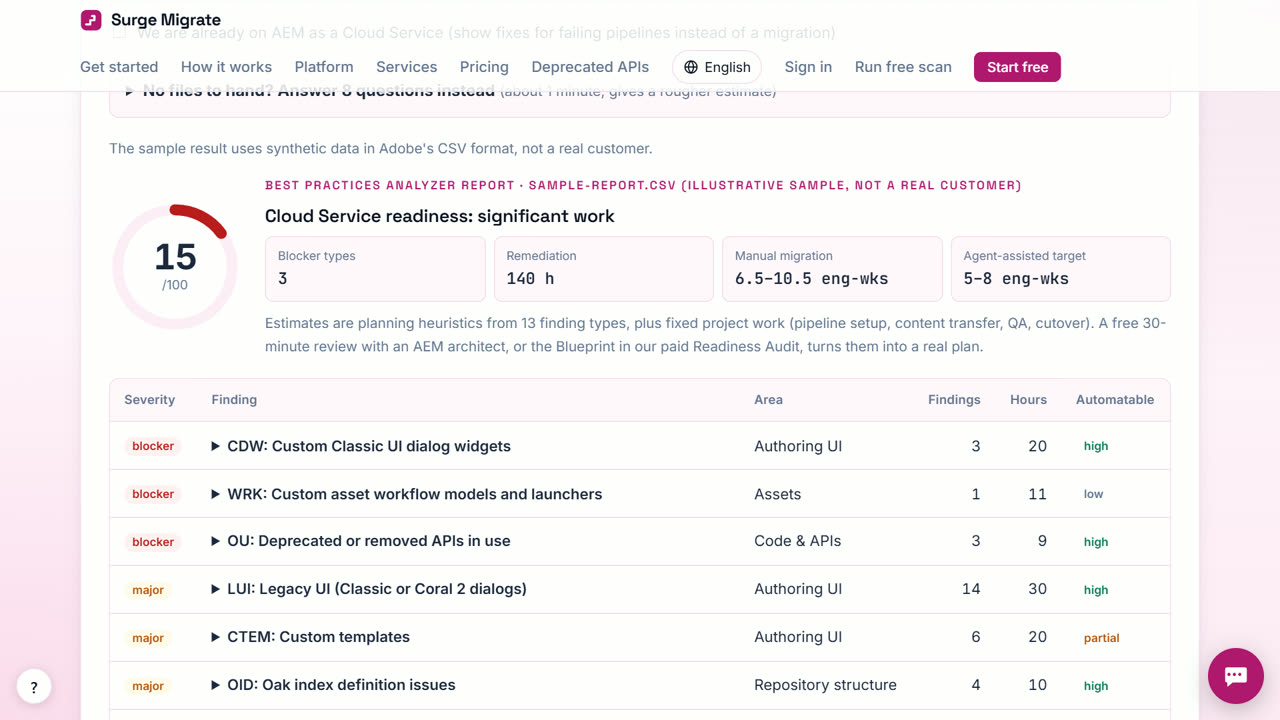
What you get
- A readiness score out of 100
- Findings grouped by blocker and effort, with file and line
- An effort range in engineer-weeks
- Recommended services for your estate
When Surge Migrate is not the right tool
The scan is not a full audit: it does not run your code, test content or check performance. For a written report with test plans per template and a cutover plan, the fixed-price AEM Readiness Audit is the next step.
Questions
Is the readiness scan really free?
Yes, always, and it needs no account.
Which files can I scan?
A .zip of your repository, or the BPA results .csv (or .tsv). Other files are refused.
Does it work for code already on Cloud Service?
Yes. Tick the option that you are already on Cloud Service and the scan focuses on what Cloud Manager rejects.
Read next
- Turn a Best Practices Analyzer report into a migration plan
- Estimate the effort and cost of an AEM 6.5 migration
- How to read a Best Practices Analyzer report
- Surge Migrate vs your own team with Adobe's free tools
- Pricing: free for 3 months, then at cost
Try it on your own code
The readiness scan is free and needs no account. The portal is free for your first 3 months.
Last updated 1 November 2026 · by Venu Gopal Reddy Muvva, founder