For digital, IT and procurement managers
Get a fixed-scope AEM migration plan for budget approval
Surge Migrate gives you a migration plan you can take to budget holders: the Migration Blueprint lists phases, effort in hours, risks and the decisions your team must make, built from a scan of your own code and reviewed by senior AEM engineers. A written fixed-price audit is available when procurement needs one.
The problem
Budget approval needs a scope, a timeline and the risks in writing. Without them, migrations stall in procurement, or start with a number that grows every month.
What to know first
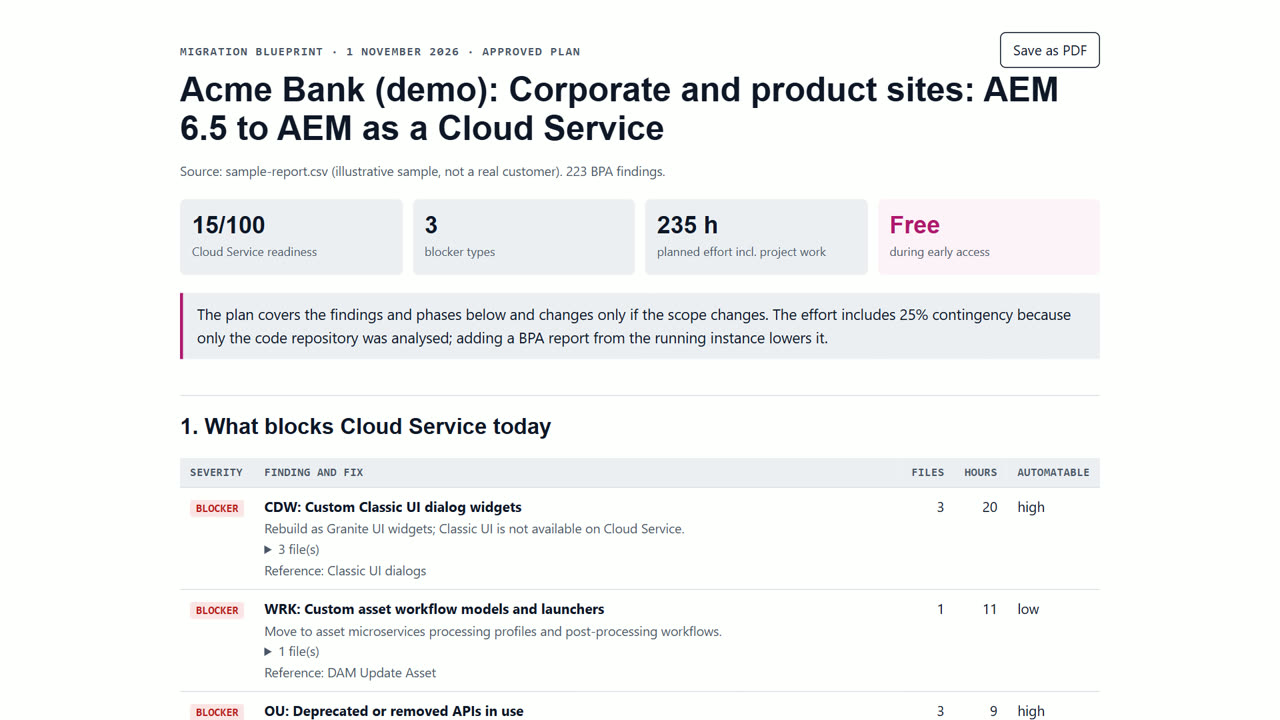
Budget holders usually ask three things: what exactly changes, how long it takes, and what could go wrong. A plan built from a scan of your own code answers the first with counts, the second with effort per phase, and the third with a risk register and the decisions only your team can make, such as replacing AEM Communities or moving a site to Edge Delivery Services.
How to do it in Surge Migrate
- Run the free readiness scan. Open the readiness scan and drop your Best Practices Analyzer CSV or a zip of your repository. It is read in your browser and nothing is uploaded. In a few minutes you see a readiness score, every blocker with file, line, fix and how automatable it is, and an effort range in engineer-weeks.
- Create your free account and a project. Press Start free, enter your work email and open the one-time link (there is no password). Name your workspace, then start a project and pick the service and how you want to work. Your first 3 months are free.
- Create the Migration Blueprint. Add the scan to the project and press Create Blueprint. You get phases, effort in hours, risks and the decisions your team must make. Our engineers review and approve it; open it in the browser, save it as PDF or publish it to Confluence.
- Share it with decision makers. Invite colleagues to the workspace, save the Blueprint as PDF, or publish it to Confluence. Export findings to Jira as an epic with issues for planning.
- Record the decisions. Each decision in the Blueprint is approved or rejected in the portal by a named person, and kept in the audit trail.
- Order the written audit if needed. The AEM Readiness Audit delivers a written report and Blueprint within 10 business days: US$2,500 for the first 2 audits, then US$4,900, half upfront and half on delivery.
What you get
- Phases, effort and risks from your own code
- Named decisions with an audit trail
- PDF, Confluence and Jira exports
- A fixed-price written audit option
When Surge Migrate is not the right tool
If you need a business case for moving off AEM entirely, or a vendor selection across CMS platforms, this is the wrong tool: it plans AEM-to-AEM moves.
Questions
Is the Blueprint free?
Creating a Blueprint in the portal is free. The written Readiness Audit is a fixed-price service.
Can I export it?
Yes: browser PDF, a server-made PDF where switched on, Confluence, and Jira for the findings.
Who reviews it?
Senior AEM engineers at Surge review and approve every Blueprint.
Read next
- Estimate the effort and cost of an AEM 6.5 migration
- Migrate AEM 6.5 to AEM as a Cloud Service
- What does an AEM 6.5 to Cloud Service migration cost?
- Surge Migrate vs a large systems integrator
- Pricing: free for 3 months, then at cost
Try it on your own code
The readiness scan is free and needs no account. The portal is free for your first 3 months.
Last updated 1 November 2026 · by Venu Gopal Reddy Muvva, founder